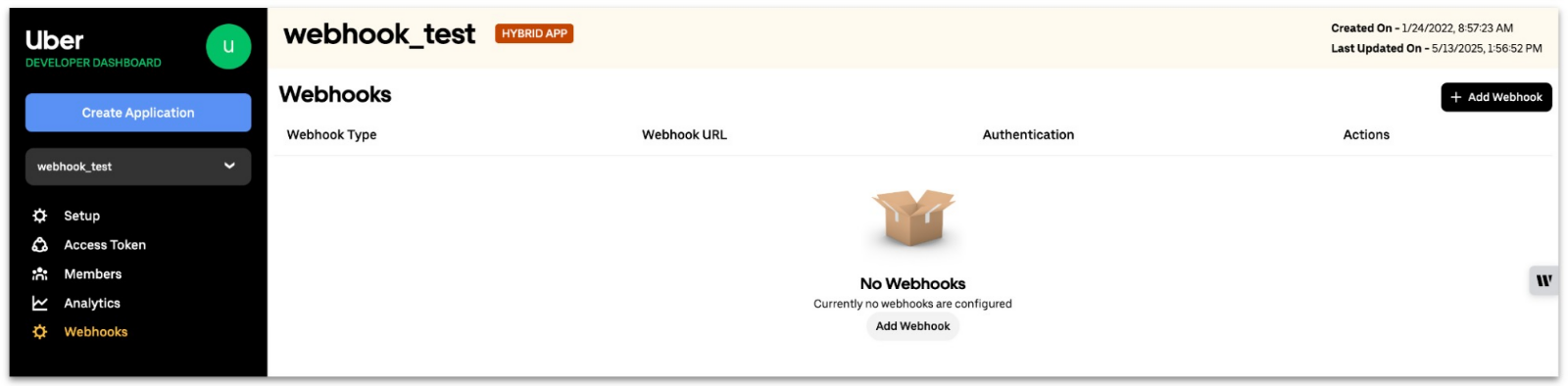
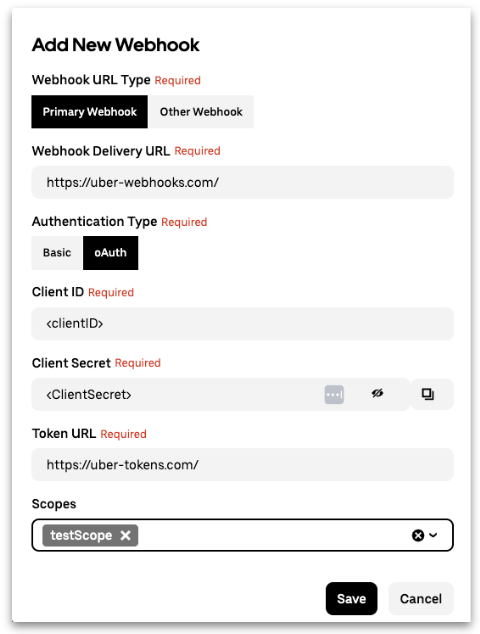
{"__v":28,"_id":"564bcf5402c94e0d00a7e8b7","category":{"__v":15,"_id":"564bcf5402c94e0d00a7e8b1","pages":["564bcf5402c94e0d00a7e8b4","564bcf5402c94e0d00a7e8b5","564bcf5402c94e0d00a7e8b6","564bcf5402c94e0d00a7e8b7","564bcf5402c94e0d00a7e8b8","564bcf5402c94e0d00a7e8b9","564bcf5402c94e0d00a7e8ba","564bcf5402c94e0d00a7e8bb","564bcf5402c94e0d00a7e8bc","564bcf5402c94e0d00a7e8bd","564cb7be7aaf643500db4005","564cb7f55058252100ce8f8d","564cb80aa5df103500477934","564cb8287aaf643500db4009","56621a93789d740d00bc53c6","568db38a50d03d0d00415fc5","56931e1572d4580d0081e9db","5693e6b2bcd0a90d0044d257","569404e65f1c951900644c5b","56940af2bcd0a90d0044d2ac","569840bdc1ffbe0d001d3e19","56b4e82727d9c00d005d6c14","56df16b114092732005e89e7","56e358c7ddb6c30e00dc4154"],"project":"5617f98f7f74330d00dfd86d","version":"564bcf5302c94e0d00a7e8b0","reference":false,"createdAt":"2015-10-09T17:29:53.158Z","from_sync":false,"order":3,"slug":"api-guides","title":"Guides"},"parentDoc":null,"project":"5617f98f7f74330d00dfd86d","user":"5617f95d7f74330d00dfd86c","version":{"__v":10,"_id":"564bcf5302c94e0d00a7e8b0","project":"5617f98f7f74330d00dfd86d","hasDoc":true,"hasReference":true,"createdAt":"2015-11-18T01:07:31.166Z","releaseDate":"2015-11-18T01:07:31.166Z","categories":["564bcf5402c94e0d00a7e8b1","564bcf5402c94e0d00a7e8b2","564bcf5402c94e0d00a7e8b3","564bcf5e8b1c5521002bb91e","564bcfa12c4e3a3500f91237","564bcfaa02c94e0d00a7e8d1","564bcfb542e6862300fc7719","564cc3165058252100ce8fa0","565ca2a0ea82b00d00f94a30","56983c4fbacbc30d00b5b332","56e0eb865ad55a2000743cfa","56e0eb9bd00f551900c8a957"],"is_deprecated":false,"is_hidden":false,"is_beta":false,"is_stable":true,"codename":"","version_clean":"1.1.0","version":"1.1"},"updates":[],"createdAt":"2015-10-29T16:51:33.012Z","link_external":false,"link_url":"","githubsync":"","sync_unique":"","hidden":false,"api":{"results":{"codes":[]},"settings":"","auth":"required","params":[],"url":""},"isReference":false,"order":4,"body":"# Introduction\n\nThere are some cases where it is useful for your application to be notified of changes in a resource rather than requesting that state from the API directly. For instance, webhooks can be very useful to track the state changes of a ride request or get notified of the existence of a trip in the case of the `all_trips` scope.\n\nUnder the application settings tab of your [developer dashboard](https://developer.uber.com/dashboard) you are able to specify a `webhook URL`, this is the URL at which your server will receive `POST` requests about the changes in state of resources it may be interested in.\n\nWebhooks sent from Uber's servers will follow a standard format so that your application can easily understand if and what action it may want to take based on the contents of the payload. Below are the POST parameters that can be expected with each POST request received.\n\n## JSON Body POST Parameters\n[block:html]\n{\n  \"html\": \"<table>\\n<colgroup>\\n<col width=\\\"25%\\\" />\\n<col width=\\\"17%\\\" />\\n<col width=\\\"56%\\\" />\\n</colgroup>\\n<thead>\\n<tr class=\\\"header\\\">\\n<th align=\\\"left\\\">Name</th>\\n<th align=\\\"left\\\">Type</th>\\n<th align=\\\"left\\\">Description</th>\\n</tr>\\n</thead>\\n<tbody>\\n<tr class=\\\"odd\\\">\\n<td align=\\\"left\\\"><code>event_id</code></td>\\n<td align=\\\"left\\\"><code>string</code></td>\\n<td align=\\\"left\\\">Unique event identifier, which can be used to ensure that events are only digested once.</td>\\n</tr>\\n<tr class=\\\"even\\\">\\n<td align=\\\"left\\\"><code>event_time</code></td>\\n<td align=\\\"left\\\"><code>integer</code></td>\\n<td align=\\\"left\\\">Unix timestamp of the time the event occurred.</td>\\n</tr>\\n<tr class=\\\"odd\\\">\\n<td align=\\\"left\\\"><code>event_type</code></td>\\n<td align=\\\"left\\\"><code>string</code></td>\\n<td align=\\\"left\\\">The type of event that occurred.</td>\\n</tr>\\n<tr class=\\\"even\\\">\\n<td align=\\\"left\\\"><code>meta</code></td>\\n<td align=\\\"left\\\"><code>object</code></td>\\n<td align=\\\"left\\\">The object containing additional information that is specific to the <code>event_type</code>.</td>\\n</tr>\\n<td align=\\\"left\\\"><code>meta.user_id</code></td>\\n<td align=\\\"left\\\"><code>string</code></td>\\n<td align=\\\"left\\\">Unique identifier of the user this event was generated for.</td>\\n</tr>\\n<tr class=\\\"odd\\\">\\n<td align=\\\"left\\\"><code>meta.resource_id</code></td>\\n<td align=\\\"left\\\"><code>string</code></td>\\n<td align=\\\"left\\\">Unique identifier of the resource this event has been generated for.</td>\\n</tr>\\n<tr class=\\\"even\\\">\\n<td align=\\\"left\\\"><code>meta.status</code></td>\\n<td align=\\\"left\\\"><code>string</code></td>\\n<td align=\\\"left\\\">The status of the Request indicating state that just changed.</td>\\n</tr>\\n<tr class=\\\"odd\\\">\\n<td align=\\\"left\\\"><code>meta.resource_type</code></td>\\n<td align=\\\"left\\\"><code>string</code></td>\\n<td align=\\\"left\\\">The type of resource: <code>request</code></td>\\n</tr>\\n<tr class=\\\"even\\\">\\n<td align=\\\"left\\\"><code>resource_href</code></td>\\n<td align=\\\"left\\\"><code>string</code></td>\\n<td align=\\\"left\\\">Contains the URL to <code>GET</code> to request the entire resource.</td>\\n</tr>\\n</tbody>\\n</table>\"\n}\n[/block]\n# Events\n\n## `all_trips.status_changed`\n\nGiven that your application has the `all_trips` scope and that you have a valid OAuth authorization for a user and the `all_trips` scope, Uber's server will make a POST to your application's `webhook url` whenever the `status` of any trip the user is taking with Uber changes. \n\nThis can help notify your application when a user goes on trip and the state changes of those trips without having to continuously poll [`GET /v1/requests/current`](https://developer.uber.com/docs/v1-requests-current).\n\nPlease refer to [GET /v1/requests/current](https://developer.uber.com/docs/v1-requests-current#section-request-statuses) for the possible values of `status` for a trip request.\n\n### Example POST\n\n``` sourceCode\n{\n    \"event_id\": \"3a3f3da4-14ac-4056-bbf2-d0b9cdcb0777\",\n    \"event_time\": 1427343990,\n    \"event_type\": \"all_trips.status_changed\",\n    \"meta\": {\n        \"user_id\": \"d13dff8b\",\n        \"resource_id\": \"2a2f3da4\",\n        \"resource_type\": \"request\",\n        \"status\": \"accepted\"\n    },\n    \"resource_href\": \"https://api.uber.com/v1/requests/2a2f3da4\"\n}\n```\n\n## `requests.status_changed`\n\nFor all **Requests** created by your application at `POST /v1/requests`, Uber's server will make a POST to your application's `webhook url` whenever the status changes. This can help you notify the user of these state changes or change the state of your app to reflect a status change without continuously polling [`GET /v1/requests/current`](https://developer.uber.com/docs/v1-requests-current).\n\nPlease refer to [GET /v1/requests/current](https://developer.uber.com/docs/v1-requests-current#section-request-statuses) for the possible values of `status` for a trip request.\n\n### Example POST\n\n``` sourceCode\n{\n    \"event_id\": \"3a3f3da4-14ac-4056-bbf2-d0b9cdcb0777\",\n    \"event_time\": 1427343990,\n    \"event_type\": \"requests.status_changed\",\n    \"meta\": {\n        \"user_id\": \"d13dff8b\",\n        \"resource_id\": \"2a2f3da4\",\n        \"resource_type\": \"request\",\n        \"status\": \"in_progress\"\n    },\n    \"resource_href\": \"https://api.uber.com/v1/requests/2a2f3da4\"\n}\n```\n\n## `requests.receipt_ready`\n\nGiven that your application has access to the `request_receipt` scope and the user has authorized your application access for this scope, for all **Requests** created by your application at `POST /v1/requests`, Uber's server will make a `POST` request to your application's `webhook url` when the **Request Receipt** is available. This will allow you to show your user the details of their fare and how much they were charged as soon as their **Receipt** is available. If the rider cancels after the grace period, and they are charged, a receipt will be available showing that charge.\n\n### Example POST\n\n``` sourceCode\n{\n    \"event_id\": \"2a2f3da4-14ac-4056-bbf2-d0b9cdcb0777\",\n    \"event_time\": 1427343990,\n    \"event_type\": \"requests.receipt_ready\",\n    \"meta\": {\n        \"user_id\": \"d13dff8b\",\n        \"resource_id\": \"d0b9cdc\",\n        \"resource_type\": \"request_receipt\",\n        \"status\": \"ready\"\n    },\n    \"resource_href\": \"https://api.uber.com/v1/requests/d0b9cdc/receipt\"\n}\n```\n\n# Reference\n\n## Sandbox\n\nWhen making *Requests* in the sandbox environment, we will also emit webhook events for simulated trips. The `requests.status_changed` event will be emitted every time the status of a simulated *Request* changes.\n\nThe `requests.receipt_ready` event will be emitted once a Request’s status changes to completed.\n\n## Security\n\nWebhook messages are signed so that your app can verify that the sender is Uber. Webhooks requests contain an `X-Uber-Signature` header. The value of this field is a hexadecimal HMAC signature of the webhook HTTP request body, using the client secret as a key and SHA256 as the hash function.\n\nPython Example\n```\ndigester = hmac.new(client_secret, webhook_body, hashlib.sha256)\nreturn digester.hexdigest()\n```\n\n**Note:** Due to a strict interpretation of the JSON specification by JavaScript, if there are backslashes sent in the POST body, they will be removed upon parsing. This prevents webhook receivers implemented in NodeJS from verifying the webhook signature accurately. We are working on removing all backslashes from the payload in order to avoid this situation and will remove this note when that work is done.\n\n## Headers\n\nThe Uber API will insert specialized headers for all requests made to your WEBHOOK URL to help your application utilize them appropriately.\n[block:parameters]\n{\n  \"data\": {\n    \"h-0\": \"Header\",\n    \"h-1\": \"Description\",\n    \"0-0\": \"`X-Environment`\",\n    \"0-1\": \"Indicates if this request is coming from the `production` or `sandbox` API.\",\n    \"1-0\": \"`X-Uber-Signature`\",\n    \"1-1\": \"SHA256 hash of the request body, using the client secret as the key.\"\n  },\n  \"cols\": 2,\n  \"rows\": 2\n}\n[/block]\n\n## Retry Attempts\n\nIf for some reason the Uber API cannot reach the WEBHOOK URL you specified either due to networking issues or application issues on your end, the webhooks service will retry to make a request.\n\nWe have implemented an exponential back-off algorithm with a back-off multiplier of 30 seconds which will make up to 7 attempts. This means we will attempt to request your WEBHOOK URL up to 7 times across roughly 1 hour.\n\nInitial try at 0 seconds, followed by 30 seconds, then 60 seconds, then 120, etc.","excerpt":"","slug":"webhooks","type":"basic","title":"Webhooks"}
# Introduction There are some cases where it is useful for your application to be notified of changes in a resource rather than requesting that state from the API directly. For instance, webhooks can be very useful to track the state changes of a ride request or get notified of the existence of a trip in the case of the `all_trips` scope. Under the application settings tab of your [developer dashboard](https://developer.uber.com/dashboard) you are able to specify a `webhook URL`, this is the URL at which your server will receive `POST` requests about the changes in state of resources it may be interested in. Webhooks sent from Uber's servers will follow a standard format so that your application can easily understand if and what action it may want to take based on the contents of the payload. Below are the POST parameters that can be expected with each POST request received. ## JSON Body POST Parameters [block:html] { "html": "<table>\n<colgroup>\n<col width=\"25%\" />\n<col width=\"17%\" />\n<col width=\"56%\" />\n</colgroup>\n<thead>\n<tr class=\"header\">\n<th align=\"left\">Name</th>\n<th align=\"left\">Type</th>\n<th align=\"left\">Description</th>\n</tr>\n</thead>\n<tbody>\n<tr class=\"odd\">\n<td align=\"left\"><code>event_id</code></td>\n<td align=\"left\"><code>string</code></td>\n<td align=\"left\">Unique event identifier, which can be used to ensure that events are only digested once.</td>\n</tr>\n<tr class=\"even\">\n<td align=\"left\"><code>event_time</code></td>\n<td align=\"left\"><code>integer</code></td>\n<td align=\"left\">Unix timestamp of the time the event occurred.</td>\n</tr>\n<tr class=\"odd\">\n<td align=\"left\"><code>event_type</code></td>\n<td align=\"left\"><code>string</code></td>\n<td align=\"left\">The type of event that occurred.</td>\n</tr>\n<tr class=\"even\">\n<td align=\"left\"><code>meta</code></td>\n<td align=\"left\"><code>object</code></td>\n<td align=\"left\">The object containing additional information that is specific to the <code>event_type</code>.</td>\n</tr>\n<td align=\"left\"><code>meta.user_id</code></td>\n<td align=\"left\"><code>string</code></td>\n<td align=\"left\">Unique identifier of the user this event was generated for.</td>\n</tr>\n<tr class=\"odd\">\n<td align=\"left\"><code>meta.resource_id</code></td>\n<td align=\"left\"><code>string</code></td>\n<td align=\"left\">Unique identifier of the resource this event has been generated for.</td>\n</tr>\n<tr class=\"even\">\n<td align=\"left\"><code>meta.status</code></td>\n<td align=\"left\"><code>string</code></td>\n<td align=\"left\">The status of the Request indicating state that just changed.</td>\n</tr>\n<tr class=\"odd\">\n<td align=\"left\"><code>meta.resource_type</code></td>\n<td align=\"left\"><code>string</code></td>\n<td align=\"left\">The type of resource: <code>request</code></td>\n</tr>\n<tr class=\"even\">\n<td align=\"left\"><code>resource_href</code></td>\n<td align=\"left\"><code>string</code></td>\n<td align=\"left\">Contains the URL to <code>GET</code> to request the entire resource.</td>\n</tr>\n</tbody>\n</table>" } [/block] # Events ## `all_trips.status_changed` Given that your application has the `all_trips` scope and that you have a valid OAuth authorization for a user and the `all_trips` scope, Uber's server will make a POST to your application's `webhook url` whenever the `status` of any trip the user is taking with Uber changes. This can help notify your application when a user goes on trip and the state changes of those trips without having to continuously poll [`GET /v1/requests/current`](https://developer.uber.com/docs/v1-requests-current). Please refer to [GET /v1/requests/current](https://developer.uber.com/docs/v1-requests-current#section-request-statuses) for the possible values of `status` for a trip request. ### Example POST ``` sourceCode { "event_id": "3a3f3da4-14ac-4056-bbf2-d0b9cdcb0777", "event_time": 1427343990, "event_type": "all_trips.status_changed", "meta": { "user_id": "d13dff8b", "resource_id": "2a2f3da4", "resource_type": "request", "status": "accepted" }, "resource_href": "https://api.uber.com/v1/requests/2a2f3da4" } ``` ## `requests.status_changed` For all **Requests** created by your application at `POST /v1/requests`, Uber's server will make a POST to your application's `webhook url` whenever the status changes. This can help you notify the user of these state changes or change the state of your app to reflect a status change without continuously polling [`GET /v1/requests/current`](https://developer.uber.com/docs/v1-requests-current). Please refer to [GET /v1/requests/current](https://developer.uber.com/docs/v1-requests-current#section-request-statuses) for the possible values of `status` for a trip request. ### Example POST ``` sourceCode { "event_id": "3a3f3da4-14ac-4056-bbf2-d0b9cdcb0777", "event_time": 1427343990, "event_type": "requests.status_changed", "meta": { "user_id": "d13dff8b", "resource_id": "2a2f3da4", "resource_type": "request", "status": "in_progress" }, "resource_href": "https://api.uber.com/v1/requests/2a2f3da4" } ``` ## `requests.receipt_ready` Given that your application has access to the `request_receipt` scope and the user has authorized your application access for this scope, for all **Requests** created by your application at `POST /v1/requests`, Uber's server will make a `POST` request to your application's `webhook url` when the **Request Receipt** is available. This will allow you to show your user the details of their fare and how much they were charged as soon as their **Receipt** is available. If the rider cancels after the grace period, and they are charged, a receipt will be available showing that charge. ### Example POST ``` sourceCode { "event_id": "2a2f3da4-14ac-4056-bbf2-d0b9cdcb0777", "event_time": 1427343990, "event_type": "requests.receipt_ready", "meta": { "user_id": "d13dff8b", "resource_id": "d0b9cdc", "resource_type": "request_receipt", "status": "ready" }, "resource_href": "https://api.uber.com/v1/requests/d0b9cdc/receipt" } ``` # Reference ## Sandbox When making *Requests* in the sandbox environment, we will also emit webhook events for simulated trips. The `requests.status_changed` event will be emitted every time the status of a simulated *Request* changes. The `requests.receipt_ready` event will be emitted once a Request’s status changes to completed. ## Security Webhook messages are signed so that your app can verify that the sender is Uber. Webhooks requests contain an `X-Uber-Signature` header. The value of this field is a hexadecimal HMAC signature of the webhook HTTP request body, using the client secret as a key and SHA256 as the hash function. Python Example ``` digester = hmac.new(client_secret, webhook_body, hashlib.sha256) return digester.hexdigest() ``` **Note:** Due to a strict interpretation of the JSON specification by JavaScript, if there are backslashes sent in the POST body, they will be removed upon parsing. This prevents webhook receivers implemented in NodeJS from verifying the webhook signature accurately. We are working on removing all backslashes from the payload in order to avoid this situation and will remove this note when that work is done. ## Headers The Uber API will insert specialized headers for all requests made to your WEBHOOK URL to help your application utilize them appropriately. [block:parameters] { "data": { "h-0": "Header", "h-1": "Description", "0-0": "`X-Environment`", "0-1": "Indicates if this request is coming from the `production` or `sandbox` API.", "1-0": "`X-Uber-Signature`", "1-1": "SHA256 hash of the request body, using the client secret as the key." }, "cols": 2, "rows": 2 } [/block] ## Retry Attempts If for some reason the Uber API cannot reach the WEBHOOK URL you specified either due to networking issues or application issues on your end, the webhooks service will retry to make a request. We have implemented an exponential back-off algorithm with a back-off multiplier of 30 seconds which will make up to 7 attempts. This means we will attempt to request your WEBHOOK URL up to 7 times across roughly 1 hour. Initial try at 0 seconds, followed by 30 seconds, then 60 seconds, then 120, etc.