Client Asymmetric Key Authentication
¶ Overview
This guide explains how to obtain Uber OAuth access tokens with asymmetric client authentication and how to generate a client_assertion JWT for the private_key_jwt authentication method.
Uber supports RS256 client assertions signed with RSA keys and ES256 client assertions signed with EC P-256 keys. Use the signing algorithm that matches the public key registered for your application.
¶ Prerequisite
We assume you have already done the following when you are reading this page
- registered an account and created Uber developer application at https://developer.uber.com
- requested OAuth scopes for your application(if not please contact your Uber Partner Engineer or Account Executive)
- configured asymmetric key authentication for your application in one of these ways:
- downloaded an asymmetric key file from your app’s Setup tab, or
- registered a client through Dynamic Client Registration and retained the private key that matches one of the public JWKS
kidvalues you submitted
¶ Generate Access Token - Manual integration
It’s encouraged to conduct manual test before programmatically integrating with your production system. This section provides step-by-step guide to manually generate access token with the asymmetric key.
¶ Example request and response
The example below generates access token with client_credentials grant type. Please refer to Supported Grant Types for more examples for other grant types such as authorization_code, refresh_token, or token_exchange.
# request
curl -X POST "https://auth.uber.com/oauth/v2/token" \
     -H 'Content-Type: application/x-www-form-urlencoded' \
     --data-urlencode 'grant_type=client_credentials' \
     --data-urlencode 'client_id=${client_id}' \
     --data-urlencode 'scope=${space_delimited_scopes}' \
     --data-urlencode 'client_assertion=${client_assertion_you_generated}' \
     --data-urlencode 'client_assertion_type=urn:ietf:params:oauth:client-assertion-type:jwt-bearer'

# response
{
    "access_token": "${access_token}",
    "token_type": "Bearer",
    "expires_in": "${expires_in_seconds}",
    "scope": "${scopes_you_requested}"
}
Explanation of the request parameters
scope: it’s a list of OAuth scopes granted to your app delimited by spaceclient_id: it’s the client ID of the application you are authenticatingclient_assertion: it’s a JWT to authenticate your application, please follow the tutorial below to generate it
How to generate client assertion
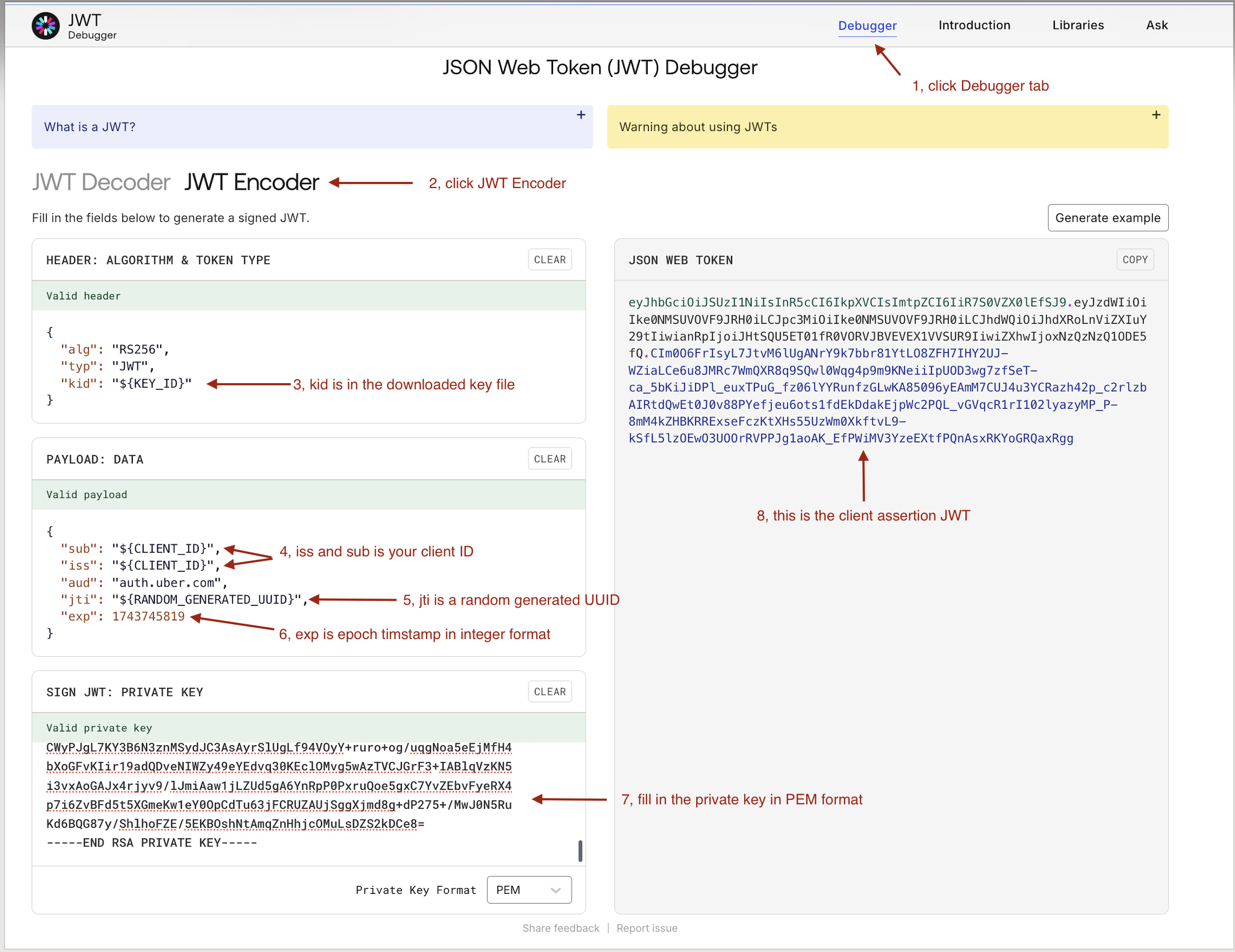
step 1: prepare header and payload
header:
alg:RS256for an RSA key orES256for an EC P-256 key, Stringtyp: JWT, Stringkid: key id from key file, String
payload:
iss: The client ID of the developer application, Stringsub: The client ID of the developer application, Stringaud: auth.uber.com, Stringjti: A unique identifier for the JWT, Stringiat: The issued-at time of the JWT as Unix epoch seconds, Int
exp: The expiration time of the JWT as Unix epoch seconds, Int. Use a short validity window, for example 5-15 minutes.
step 2: get the public key from the downloaded key file and convert it to PEM format. This is useful when using jwt.io to verify the signature locally. If you registered through DCR, use the public key from the same key pair you put in your JWKS.
echo "${public_key_from_key_file}" | sed 's/\\n/\n/g'
step 3: get the private key and convert it to PEM format. If you registered through DCR, use the private key that matches the JWKS kid you will put in the JWT header.
echo "${private_key_from_key_file}" | sed 's/\\n/\n/g'
step 4: generate client assertion JWT. We will use jwt.io as an example, you are welcome to use any library or tool
¶ Supported signing algorithms
JWT alg |
Key type | Key requirements |
|---|---|---|
RS256 |
RSA | RSA-2048 or stronger |
ES256 |
EC | P-256 curve only |
The kid in the JWT header must match the key ID for the RSA or EC public key registered on the application. If the application was registered through DCR, use the private key that matches one of the public JWKS keys you submitted.
¶ Generate Access Token - Programmatic integration
To integrate your backend with Uber OAuth server, please refer to Authorization API and Access Token API.
This section provides code snippets that you can use in programmatic integration, please note that we do NOT provide key file I/O logic because different customers might handle I/O differently.
¶ Golang
expand to see code snippets
import (
	"crypto/ecdsa"
	"crypto/elliptic"
	"crypto/rsa"
	"fmt"
	"time"

	"github.com/golang-jwt/jwt"
	"github.com/google/uuid"
)

func GenerateJWT(clientID string, privateKey interface{}, keyID string) (string, error) {
	now := time.Now()
	claims := jwt.MapClaims{
		"iss": clientID,
		"sub": clientID,
		"aud": "auth.uber.com",
		"jti": uuid.New().String(),
		"iat": now.Unix(),
		"exp": now.Add(15 * time.Minute).Unix(),
	}

	var signingMethod jwt.SigningMethod
	switch key := privateKey.(type) {
	case *rsa.PrivateKey:
		signingMethod = jwt.SigningMethodRS256
	case *ecdsa.PrivateKey:
		if key.Curve != elliptic.P256() {
			return "", fmt.Errorf("unsupported EC curve")
		}
		signingMethod = jwt.SigningMethodES256
	default:
		return "", fmt.Errorf("unsupported private key type")
	}

	token := jwt.NewWithClaims(signingMethod, claims)
	token.Header["kid"] = keyID

	return token.SignedString(privateKey)
}

func LoadPrivateKey(path string) (*rsa.PrivateKey, error) {
	// Implementation to load private key from file
	// ...
}
¶ Java
expand to see code snippets
import com.auth0.jwt.JWT;
import com.auth0.jwt.algorithms.Algorithm;
import java.security.PrivateKey;
import java.security.interfaces.ECPrivateKey;
import java.security.interfaces.RSAPrivateKey;
import java.time.Instant;
import java.util.Date;
import java.util.UUID;

public class JWTGenerator {
    public static String generateJWT(String clientId, PrivateKey privateKey, String keyId) {
        Instant now = Instant.now();
        Algorithm algorithm;
        if (privateKey instanceof RSAPrivateKey) {
            algorithm = Algorithm.RSA256(null, (RSAPrivateKey) privateKey);
        } else if (privateKey instanceof ECPrivateKey) {
            algorithm = Algorithm.ECDSA256(null, (ECPrivateKey) privateKey);
        } else {
            throw new IllegalArgumentException("Unsupported private key type");
        }

        return JWT.create()
                .withKeyId(keyId)
                .withIssuer(clientId)
                .withSubject(clientId)
                .withAudience("auth.uber.com")
                .withJWTId(UUID.randomUUID().toString())
                .withIssuedAt(Date.from(now))
                .withExpiresAt(Date.from(now.plusSeconds(900)))
                .sign(algorithm);
    }

    public static PrivateKey loadPrivateKey(String path) throws Exception {
        // Implementation to load private key from file
        // ...
    }
}
¶ Python
expand to see code snippets
import jwt
import uuid
from datetime import datetime, timedelta

def generate_jwt(client_id, private_key, key_id, algorithm="RS256"):
    now = datetime.utcnow()
    payload = {
        "iss": client_id,
        "sub": client_id,
        "aud": "auth.uber.com",
        "jti": str(uuid.uuid4()),
        "iat": int(now.timestamp()),
        "exp": int((now + timedelta(minutes=15)).timestamp())
    }
    headers = {
        "alg": algorithm,
        "typ": "JWT",
        "kid": key_id
    }
    return jwt.encode(payload, private_key, algorithm=algorithm, headers=headers)

def load_private_key(path):
    # Implementation to load private key from file
    # ...
For ES256, pass an EC P-256 private key and set algorithm="ES256". For RS256, pass an RSA private key and keep algorithm="RS256".
¶ Supported Grant Types
Asymmetric key authentication is supported for these grant types:
- client_credentials
- authorization_code
- refresh_token
- urn:ietf:params:oauth:grant-type:token-exchange
This section will provide CLI examples for each grant type
¶ Client Credentials
expand to see example
# request
curl -X POST "https://auth.uber.com/oauth/v2/token" \
     -H 'Content-Type: application/x-www-form-urlencoded' \
     --data-urlencode 'grant_type=client_credentials' \
     --data-urlencode 'client_id=${client_id}' \
     --data-urlencode 'scope=${space_delimited_scopes}' \
     --data-urlencode 'client_assertion=${client_assertion_you_generated}' \
     --data-urlencode 'client_assertion_type=urn:ietf:params:oauth:client-assertion-type:jwt-bearer'

# response
{
    "access_token": "${access_token}",
    "token_type": "Bearer",
    "expires_in": "${expires_in_seconds}",
    "scope": "${scopes_you_requested}"
}
¶ Authorization Code
expand to see example
firstly call /authorize to get the authorization code
# end user will trigger this request from their browser
https://auth.uber.com/oauth/v2/authorize?client_id=${CLIENT_ID}&response_type=code&redirect_uri=${REDIRECT_URI}&scope=${SPACE_DELIMITED_SCOPES}

# response
HTTP/1.1 302 Found
Location: https://${REDIRECT_URI}?code=${AUTHORIZATION_CODE}
secondly call /token to exchange for access token
# request
curl -X POST "https://auth.uber.com/oauth/v2/token" \
     -H 'Content-Type: application/x-www-form-urlencoded' \
     --data-urlencode 'grant_type=authorization_code' \
     --data-urlencode 'client_id=${CLIENT_ID}' \
     --data-urlencode 'redirect_uri=${REDIRECT_URI}' \
     --data-urlencode 'code=${AUTHORIZATION_CODE_FROM_ABOVE_STEP}' \
     --data-urlencode 'client_assertion=${client_assertion_you_generated}' \
     --data-urlencode 'client_assertion_type=urn:ietf:params:oauth:client-assertion-type:jwt-bearer'

# response
{
    "access_token": "${access_token}",
    "refresh_token": "${refresh_token}",
    "token_type": "Bearer",
    "expires_in": "${expires_in_seconds}",
    "scope": "${scopes_you_requested}"
}
¶ Refresh Token
expand to see example
Prerequisite
To integrate with the refresh token flow, you need to obtain refresh token from Authorization Code response
# request
curl -X POST "https://auth.uber.com/oauth/v2/token" \
     -H 'Content-Type: application/x-www-form-urlencoded' \
     --data-urlencode 'grant_type=refresh_token' \
     --data-urlencode 'client_id=${CLIENT_ID}' \
     --data-urlencode 'refresh_token=${refresh_token_value}' \
     --data-urlencode 'client_assertion=${client_assertion_you_generated}' \
     --data-urlencode 'client_assertion_type=urn:ietf:params:oauth:client-assertion-type:jwt-bearer'

# response
{
    "access_token": "${access_token}",
    "refresh_token": "${refresh_token}",
    "token_type": "Bearer",
    "expires_in": "${expires_in_seconds}",
    "scope": "${scopes_you_requested}"
}
¶ Token Exchange
expand to see example
# request
curl -X POST "https://auth.uber.com/oauth/v2/token" \
     -H 'Content-Type: application/x-www-form-urlencoded' \
     --data-urlencode 'grant_type=urn:ietf:params:oauth:grant-type:token-exchange' \
     --data-urlencode 'client_id=${CLIENT_ID}' \
     --data-urlencode 'scope=${space_delimited_scopes}' \
     --data-urlencode 'subject_token=${id_token}' \
     --data-urlencode 'subject_token_type=urn:ietf:params:oauth:token-type:id_token' \
     --data-urlencode 'requested_token_type=urn:ietf:params:oauth:token-type:jwt' \
     --data-urlencode 'client_assertion_type=urn:ietf:params:oauth:client-assertion-type:jwt-bearer' \
     --data-urlencode 'client_assertion=${jwt_assertion_you_generated}'

# response
{
    "access_token": "${jwt_token}",
    "token_type": "N_A",
    "issued_token_type": "urn:ietf:params:oauth:token-type:jwt"
}
¶ Error Code
This section covers possible error code and message
expand to see error codes
| Type | Code | Description |
|---|---|---|
unsupported_grant_type |
400 | grant type is not supported |
invalid_grant |
400 | user has no authorized client for required scopes |
invalid_grant |
400 | code verifier failed verification |
invalid_request |
400 | could not parse token request |
invalid_request |
400 | code cannot be empty |
invalid_request |
400 | missing <claim_name> claim |
invalid_request |
400 | sub claim must be equal to iss claim |
invalid_request |
400 | aud must be auth.uber.com |
invalid_request |
400 | exp claim must be greater than current time |
invalid_request |
400 | public key disabled, kid: <key_id> |
invalid_request |
400 | public key not found, kid: <key_id> |
invalid_client |
401 | client secret, jwt bearer and code verifier cannot be all empty for client authentication |
invalid_client |
401 | client ID is invalid |
unauthorized_client |
401 | the current application environment is mismatched with the OAuth server runtime environment |
access_denied |
403 | client authentication failed because the client_id + jti already used |
server_error |
500 | there was an unexpected error; please try again later |